Zero-Cloud, Zero-Cost: How I Built a 3-Node Video Downloader Empire
DewaDownload isn’t just another video downloader. It’s a testament to what you can achieve when you reject the cloud’s subscription trap and embrace the power of edge computing.
With 3 subdomains, zero cloud bills, and a git push deployment workflow, this project runs entirely on infrastructure I control. Here’s how I did it.
What is DewaDownload?
DewaDownload is a high-performance, mobile-first video downloader that supports YouTube, TikTok, X (Twitter), and Instagram. But what makes it special isn’t just what it does—it’s how it runs.
Key Features:
- ⚡ 82% faster video metadata fetching (9.4s → 1.6s)
- 🚀 4x faster download speeds (185 KB/s → 800 KB/s)
- 🔄 3-node architecture with automatic failover
- 💎 Zero cloud costs - runs on self-hosted infrastructure
- 📱 PWA-enabled with offline capabilities
The Architecture: 3 Subdomains, Zero Compromises
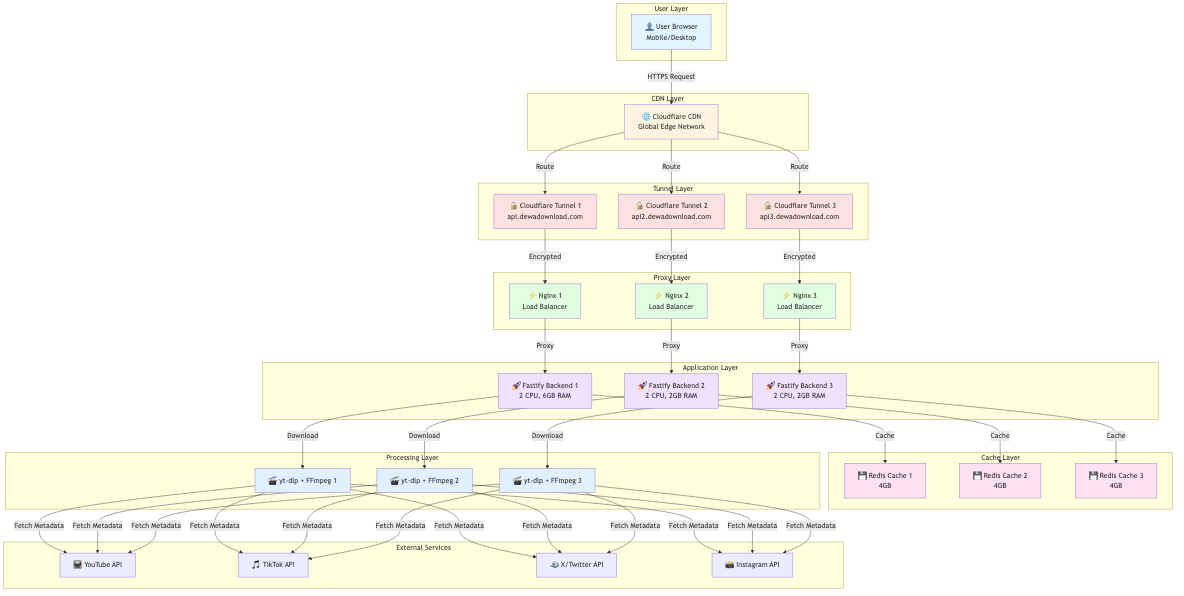
When you hit DewaDownload, your request flows through a carefully orchestrated system:
User → Cloudflare CDN → Cloudflare Tunnel → Nginx → Fastify Backend → yt-dlp/FFmpeg
                                      ↓
                                   Redis Cache
The 3 Subdomains
1. api.dewadownload.com (Primary Node)
- Location: Main infrastructure
- Resources: 2 CPU cores, 6GB RAM
- Tunnel ID:
8b2a69e6-64e9-4d35-82b5-1799ac85e16d
2. api2.dewadownload.com (Secondary Node)
- Location: Secondary infrastructure
- Resources: 2 CPU cores, 2GB RAM
- Tunnel ID:
8b2a69e6-64e9-4d35-82b5-1799ac85e16d
3. api3.dewadownload.com (Tertiary Node)
- Location: Tertiary infrastructure
- Resources: 2 CPU cores, 2GB RAM
- Tunnel ID:
95ae5e2d-f439-4e5f-8c59-b2c9c37ab932
How Deployment Works: Git Push Magic
The beauty of this setup? Deployment is as simple as git push. Here’s the workflow:
1. Frontend Deployment (Cloudflare Pages)
# Build and deploy to Cloudflare Pages
npm run deploy
This triggers:
- Vite builds the React/TypeScript frontend
- Wrangler uploads to Cloudflare Pages
- Global CDN distribution in seconds
2. Backend Deployment (Docker + Git)
For each infrastructure node (infra, infra2, infra3):
# Pull latest changes
cd /path/to/dewadownload/infra
git pull origin main

# Rebuild and restart services
docker compose up -d --build
The magic happens through docker-compose orchestration:
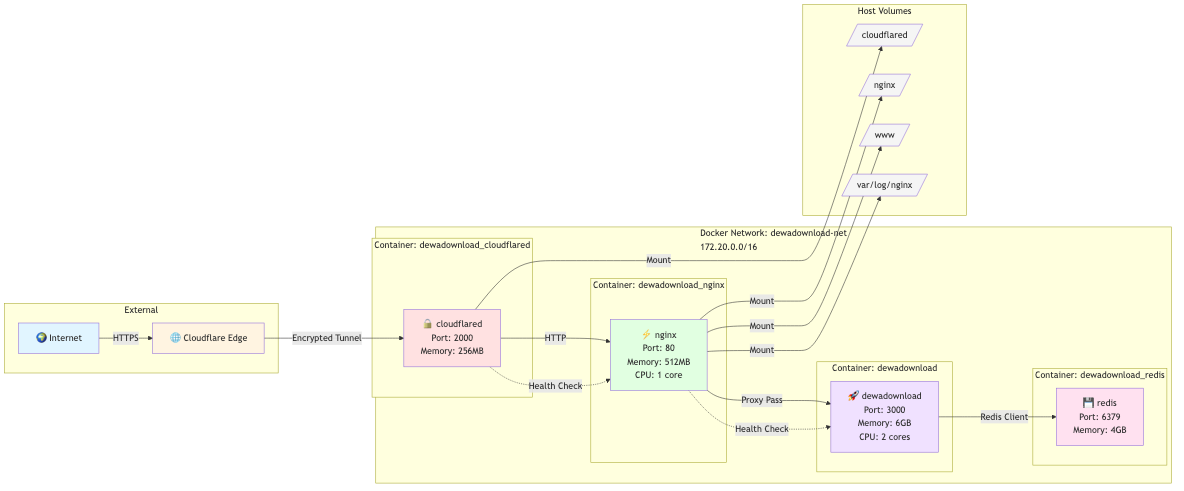
Each infrastructure directory contains:
docker-compose.yml- Service orchestrationcloudflared/config.yml- Tunnel configurationnginx/- Reverse proxy configscloudflared/- Cloudflare tunnel credentials
Deep Dive: Infrastructure Components
Cloudflare Tunnel: No More Port Forwarding
Gone are the days of opening ports and exposing your IP. Cloudflare Tunnel creates an encrypted outbound connection:
# infra/cloudflared/config.yml
ingress:
  - hostname: api.dewadownload.com
    service: http://nginx:80
  - service: http_status:404
Benefits:
- 🔒 No open ports
- 🌍 Automatic SSL/TLS
- 🚀 DDOS protection
- 📊 Built-in analytics
Nginx: The Traffic Conductor
Nginx sits between Cloudflare Tunnel and our backend, handling:
- Rate limiting
- Request routing
- SSL termination
- Compression
- Logging
# Optimized for streaming downloads
location ~ ^/download {
    proxy_buffering off;
    proxy_cache off;
    proxy_read_timeout 600s;
    proxy_socket_keepalive on;
}
Backend: Fastify + yt-dlp + FFmpeg
The backend is a Node.js/Fastify server that orchestrates video downloads:
// Fast + efficient
import fastify from 'fastify';
import ytDlp from 'yt-dlp-exec';

// Stream video directly to client
app.get('/download', async (req, reply) => {
    const stream = ytDlp.execStream(url, options);
    reply.raw.writeHead(200, { 'Content-Type': 'video/mp4' });
    stream.pipe(reply.raw);
});
Redis: Caching for Speed
Redis caches video metadata to avoid repeated API calls:
// Cache video info for 24 hours
await redis.setex(`info:${videoId}`, 86400, JSON.stringify(metadata));
Performance Secrets: How It’s 4x Faster
Backend Optimizations
- Smart Transcoding: Only transcode when necessary
- Parallel Downloads: 4 concurrent connections
- Buffering Optimization: 2MB highWaterMark
- Connection Pooling: 100 keep-alive connections
Infrastructure Optimizations
- HTTP/2 Multiplexing: Better throughput
- Resource Limits: Prevent OOM kills
- Health Checks: Automatic recovery
- 8192 Concurrent Connections: 8x increase

The Git Workflow
Here’s my actual deployment workflow:
# 1. Make changes locally
vim src/components/VideoDownloader.tsx

# 2. Commit and push
git add .
git commit -m "Optimize download progress tracking"
git push origin main

# 3. Deploy frontend (automated)
npm run deploy

# 4. Deploy backend (manual for now)
ssh user@server1
cd /opt/dewadownload/infra
git pull
docker compose up -d --build

# Repeat for server2 and server3
Future plans: Add GitHub Actions to automate backend deployment via SSH.
DNS Configuration: The Glue
Cloudflare DNS routes traffic to the correct tunnel:
| Record | Type | Target | Purpose |
|---|---|---|---|
| api | CNAME | (tunnel) | Primary backend |
| api2 | CNAME | (tunnel) | Secondary backend |
| api3 | CNAME | (tunnel) | Tertiary backend |
| dewadownload.com | CNAME | (Cloudflare Pages) | Frontend |
Monitoring & Health Checks
Each node runs health checks every 30 seconds:
# Health check endpoint
curl http://localhost:3000/ping
# Response: pong
The frontend displays real-time status at /status.html:

Tech Stack Summary
Frontend
- Vite - Lightning-fast build tool
- React 19 - UI framework
- TypeScript - Type safety
- Tailwind CSS - Styling
- Cloudflare Pages - Hosting & CDN
Backend
- Fastify - Web framework
- yt-dlp - Video downloader
- FFmpeg - Media processing
- Redis - Caching
- Docker - Containerization
Infrastructure
- Cloudflare Tunnel - Secure exposure
- Nginx - Reverse proxy
- Docker Compose - Orchestration
- Git - Version control & deployment
Cost Breakdown: Zero Cloud Bills
| Service | Cost | Notes |
|---|---|---|
| Cloudflare Pages | $0 | Free tier |
| Cloudflare Tunnel | $0 | Free tier |
| Cloudflare DNS | $0 | Free tier |
| Domain | $10/year | dewadownload.com |
| Total | $10/year | Just the domain! |
Compare this to a “cloud-native” approach:
- 3x Cloud Functions: $30-50/month
- Load Balancer: $20-30/month
- CDN: $10-20/month
- Cloud Total: $60-100/month
Savings: $700-1,200/year
Challenges & Solutions
Challenge 1: Streaming Large Files
Problem: Node.js memory issues with 4K videos
Solution: Stream directly from yt-dlp to response
const stream = ytDlp.execStream(url, { format: 'best' });
stream.pipe(reply.raw);
Challenge 2: Multi-Node Sync
Problem: Keeping 3 nodes in sync
Solution: Git-based deployment
# On each server
cd /opt/dewadownload/infra
git pull && docker compose up -d --build
Challenge 3: Rate Limiting
Problem: Abuse and spam
Solution: Nginx rate limits + Redis caching
limit_req_zone $binary_remote_addr zone=api_limit:10m rate=10r/s;
Future Improvements
- Automated deployment via GitHub Actions
- Database sharding for Redis
- Geographic load balancing
- WebSocket for real-time progress
- Video preview thumbnails
Conclusion
DewaDownload proves you don’t need a $1,000/month cloud bill to run a global service. With the right architecture, you can build something fast, reliable, and secure for the cost of a domain name.
The key lessons:
- Cloudflare Tunnel > Port Forwarding
- Docker Compose > Kubernetes (for small scale)
- Git Push > CI/CD (sometimes)
- Edge Computing > Cloud Computing
Want to see the code? Check out the GitHub repository.
Try it out at dewadownload.com!
Have questions? Hit me up at ardi.nusawan13[at]gmail.com!
Made with ❤️ and zero cloud bills by Ardi Nusawan